

Every seat. Every shift. One view.
Seat allocation software built for BPOs. SpacePulse takes every workspace request from the first form to a ready desk, with manager approval, seat allocation on a live floor map, IT setup and admin sign-off, each step tracked against an SLA.
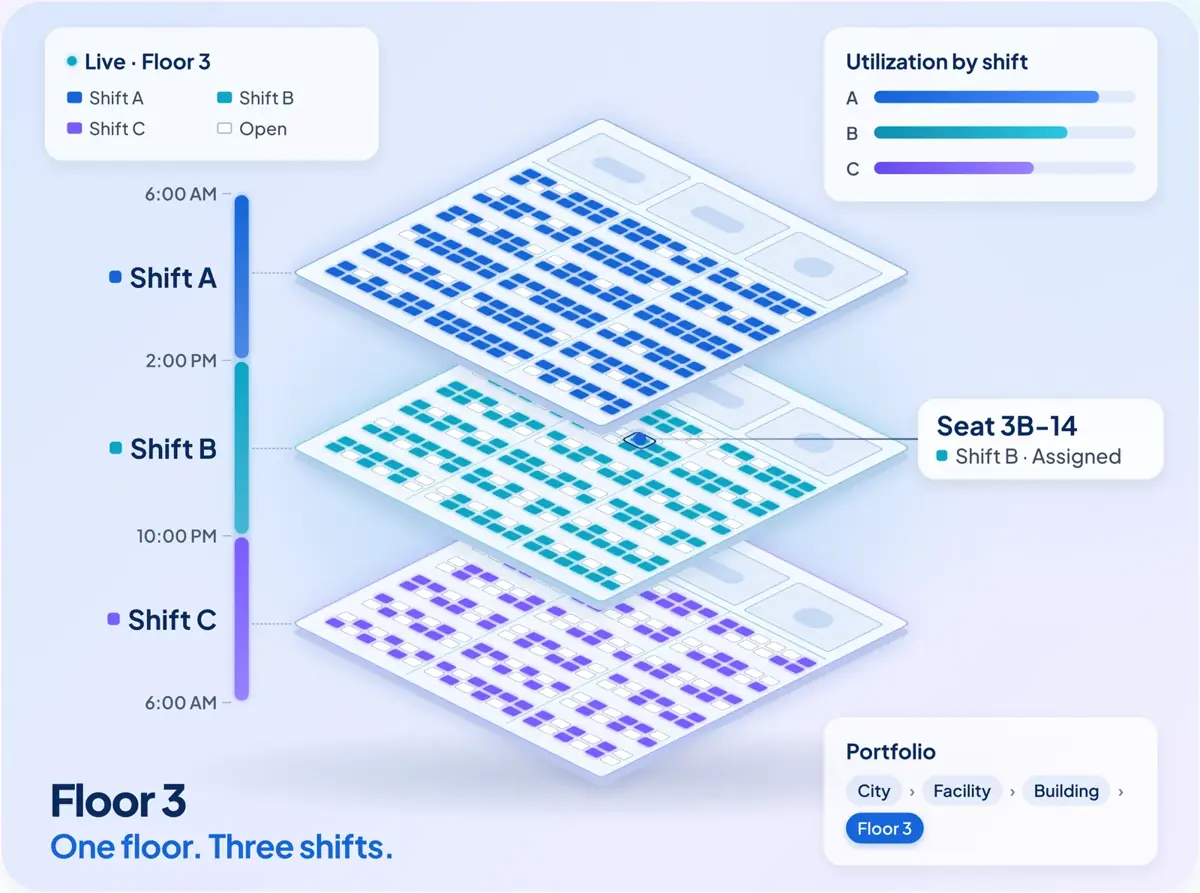
Replace spreadsheets and email chains with one workflow.
Facilities, IT and admin teams work from one shared queue, scoped to the locations they look after. Nothing gets double-booked, and nothing gets lost between teams.
Visual seat allocation
Managers pick seats straight from the floor map, filtered by shift. The same seat can be allotted to different employees on different shifts.
No double bookings
Every allotment is checked against floor, seat and shift before it's saved, so a seat can't be given out twice for the same shift.
SLA tracking
Each approval stage has a deadline. Breaches show on the dashboard for the stage the request is in, so teams see what needs attention first.
Bulk allocation and imports
Submit many requests from one CSV. Load employee masters and work-from-office rosters from Excel instead of typing them in.
Automatic updates
Requestors are emailed when they submit, when a manager decides, after IT setup and as each admin task completes.
Occupancy and reservations
Occupancy by location, drill-down to seat availability, and seats reserved for each project or client process.
Model your real offices, then manage them.
Set up your portfolio once, from country down to the seat. Upload each floor's layout from Excel and SpacePulse turns it into an interactive map.
- Country, city, facility, building, floor. One hierarchy for every site you run, with duplicate names blocked at each level.
- Excel to floor map. Seats, manager cabins and named rooms are recognized automatically from the uploaded sheet.
- Multiple shifts per seat. Each shift has its own allotment, so one desk can serve day, evening and night teams.
- Zoom and pan. Zone tabs, zoom controls and drag-to-pan keep large floors easy to read.
From request to ready desk.
A typical flow is shown below. Workflows are configurable, so you can add, remove or reorder stages to match how your operation runs.
Request
An employee raises a seat, door-access, weekend-working or training-room request, one at a time or in bulk.
Approve and allocate
The reporting manager approves and picks the facility, floor, shift and seat, or rejects with a reason.
IT setup
IT sees exactly what was requested and records the laptop, monitors and peripherals configured.
Admin sign-off
Admin confirms door access, transport and asset recovery. The request closes when every task is done.
One system for every workspace need.
Seat requests
- Work-from-home to office moves
- Training graduation and lateral hires
- Return from long leave
- Location transfer and deputation
- Seat or floor collocation
Door access
- Client and process training
- Month-end closure
- Deputation
- System issues
Weekend working
- Weekend seats with start and end dates
- Allocation by shift
Training rooms
- Classroom batches and on-the-job training
- Client and process training
- Onboarding and orientation
The right view for each role.
Managers, IT and admin teams only see the locations they're assigned to, so every queue stays short and relevant.
Employees
Raise requests, upload in bulk and track each one in a single list.
Managers
Approve, allocate seats on the map and watch SLA deadlines.
IT
See what was asked for and record what was configured.
Admin
Close out door access, transport and asset recovery.
Super users
Maintain locations, floor maps, users and the audit trail.
Built with access control from the start.
Only the right people see and change the right data.
Multi-factor sign-in
Authenticator-app verification at login.
Role and location scoping
Access enforced on the server by role and assigned location.
Encrypted traffic
API payloads encrypted in transit, on top of HTTPS.
Session control
One active session per user, with older sessions signed out immediately.
Audit trail
User actions recorded, so super users can review who did what.
Your first facility live in two weeks.
A standard SpacePulse pilot goes from kickoff to your first facility running in two weeks. We load your locations and floor layouts, configure the workflow with your team and train your managers.
Add Hilniva BI for portfolio insight
Connect SpacePulse to Hilniva BI for occupancy trends, utilization by shift, project reservations and SLA performance across every city and building.
Explore Hilniva BISee SpacePulse with your own floors.
Send us one floor layout and tell us about your shifts. We'll show you how SpacePulse fits your workspace process.